
This blog is primarily intended for cloud network engineers, cloud architects, cloud security engineers, security operations engineers, and platform engineers.
When securing networks and applications in Google Cloud, you often rely on native security tools like VPC firewall rules or Cloud Armor. However, if you require enhanced, enterprise-grade security and want all traffic inspected by a centralized firewall, additional solutions become necessary.
Deploying firewall appliances in the cloud has become increasingly common, even for teams accustomed to managing Next Generation Firewalls (NGFW) on-premises. Setting up Palo Alto NGFW in cloud environments involves several key considerations. While the concept of cloud-based firewalls may be new to some, the shift to cloud infrastructure, spanning across multiple clouds and on-premises networks, has made these deployments a standard practice.
In Google Cloud, two popular options for dedicated firewall appliances are:
- Google Next Generation Firewall (Google NGFW), delivered via Palo Alto
- Palo Alto appliance (VM-Series)
Google NGFW is fully managed, providing simplicity and scalability. In contrast, the VM-Series is a self-hosted appliance managed by the user, offering greater flexibility and control.
Choosing between the two depends on your requirements. For strict SSL decryption, custom signatures, or complete control over routing, the Palo Alto appliance is the best choice. If simplicity and ease of use are your priorities, Google NGFW may be a better option.
Google Network Connectivity Centre
Google Network Connectivity Center (NCC) is a managed service that simplifies how networks connect across Google Cloud and beyond. It provides a central hub where you bring together multiple VPCs, on-premises networks, and even multi-cloud environments.
NCC offers built-in route advertisement and propagation through Cloud Router, eliminating the need to manage complex static routes or peering configurations. It also supports features like route-based policy control, dynamic BGP peering, monitoring via network intelligence center, and flexible attachment types such as VPNs, interconnects, and VPC spokes.
By centralizing connectivity and routing, NCC makes it easier to design scalable, secure, and observable network fabrics that integrate smoothly with security appliances like Palo Alto for traffic inspection and control.
Google NCC greatly simplifies network management by offering a hub-and-spoke topology, with Palo Alto serving as the central “hub” and other resources positioned as “spokes.” In this setup, all traffic is directed through the Palo Alto appliances.
NCC’s support for centralized routing management, routing control, and BGP routing makes integrating Palo Alto in GCP significantly easier compared to using VPC peering and shared VPC alone.
Palo Alto and NCC
NCC makes deploying Palo Alto appliances in Google Cloud substantially easier, removing the need to define static routes, configure VPCs manually, or manage a single return path. It ensures all traffic is routed through Palo Alto appliances.
There are two NCC configurations available for use with Palo Alto appliances:
- NCC mesh topology
- All linked VPCs are joined together. With NCC mesh, Palo Alto is optional for east-west traffic; you must steer traffic to Palo Alto via a default route. Mesh topology is ideal for north-south inspection, and whilst east-west traffic is possible with NCC mesh, star topology is better suited for this requirement.
- NCC star topology
- Each VPC (edge spoke) connects to a centralized hub where the Palo Alto firewall acts as the next hop. This design forces all external traffic from spoke VPCs to traverse the firewall for inspection, without the need to define explicit default routes.
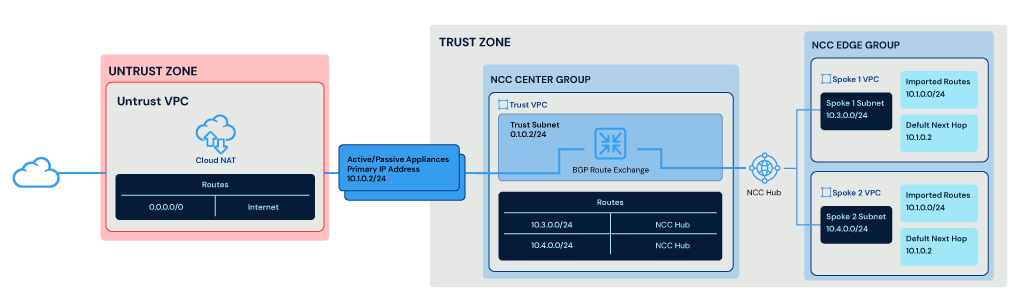
The above diagram shows Palo Alto active/passive appliances deployed between trust (east / west traffic) and untrust (north/south traffic) zones. The trust interface is hosted within the center group of NCC. The Trust VPC has two routes, `10.3.0.0/24` and `10.4.0.0/24`, which correspond to the two spoke VPCs. The spoke VPCs are hosted within the NCC edge group and have a default next hop of the current active Appliance `10.1.0.2`.
All traffic exiting the VPCs will, by default, hit the Palo Alto Firewalls. The VPC default route is provided by NCC and learned from the Palo Alto Appliances via BGP route exchange.
NCC also provides the routes back to Palo Alto for the spokes via BGP, ensuring the Palo Alto Appliances know the path back to the poke VPCs.
Border Gateway Protocol
Border Gateway Protocol (BGP) is typically used for routing of traffic between VPCs and is responsible for dynamically exchanging routes between Palo Alto appliances and NCC.
While BGP is not strictly necessary, it offers an alternative to using an internal load balancer in the trust VPC and manually configuring static routes for the spoke VPCs. The spoke VPCs themselves do not need to participate in BGP route exchange, as NCC manages this process. For each Palo Alto appliance you deploy, you will need a unique autonomous system number (ASN), along with a single ASN assigned to the cloud router.
Influencing BGP Routing with AS Path Prepend
In BGP routing, the shortest path always wins. Utilizing AS path prepending allows you to influence the routing decisions within NCC. This is especially helpful if you have more than one standalone appliance deployed. For instance, you can force all traffic via Firewall1 with no-prepend and have Firewall2 as a backup by prepending 3 times.
This setup acts like an active/passive pair but also allows you to deploy multiple appliances and influence which one to choose. However, it’s important to understand that these are standalone appliances and sessions are not synchronized.
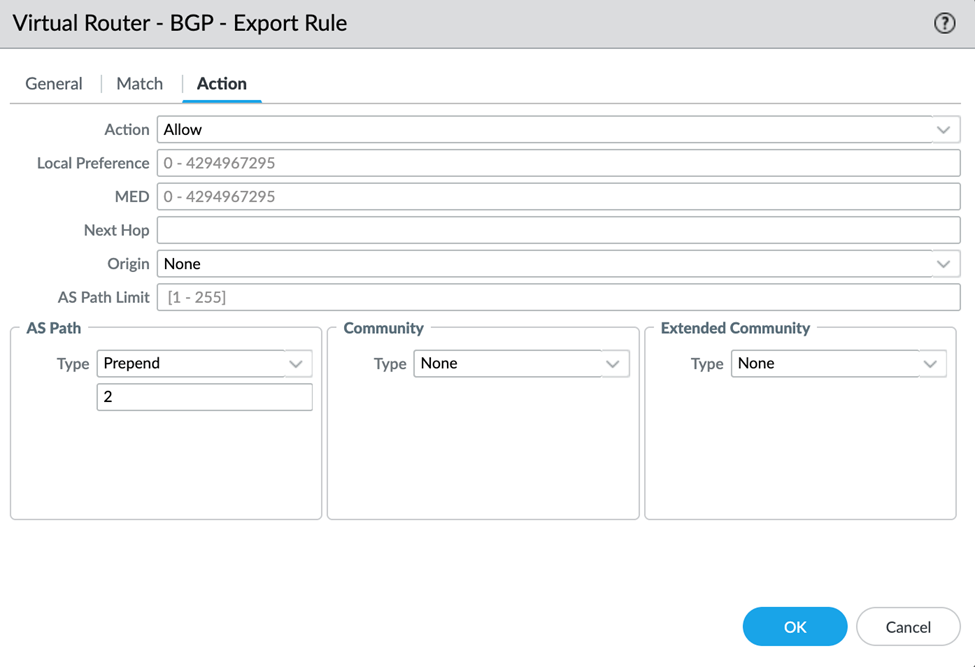
The above screenshot shows the GCP virtual router located at Network -> Virtual Routers -> gcp-vr -> BGP -> Export -> export-rule -> Action.
In this screenshot we are prepending the AS path twice, so this appliance will be the second preferred; the first appliance will not prepend.
This will export the default route 0.0.0.0/0 with the AS path prepended twice.
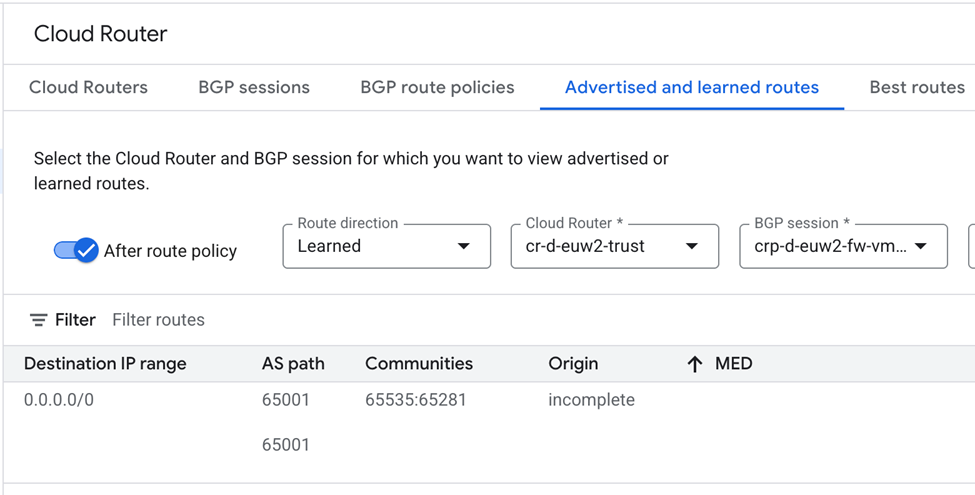
The above screenshot shows the Cloud Router and the default route 0.0.0.0/0 that the spokes will use. The AS path is clearly prepended twice, meaning this route will be the least preferred compared to a shorter route.
Route Advertisement
There are two primary ways to handle routing with BGP and Palo Alto:
- Advertise a default route to NCC: In this case, any traffic not destined for intra-VPC will traverse the Palo Alto firewalls by default.
- Advertise specific CIDRs: This approach allows tighter control over which CIDRs your VPCs will see and route to.
Typically, unless there is a very specific reason, you should always advertise a default route. This ensures that spoke VPCs will always have an egress point and will always traverse the Palo Alto appliances.
Route Advertisement with IPSec Tunnels
When terminating IPSec tunnels on the Palo Alto appliances, you can advertise these specific routes to the spoke VPCs. This allows precise control over which firewall advertises the route to each tunnel. This approach is ideal when deploying two HA IPSec connections that must fail over independently.
For example, if the primary IPSec tunnel is terminated on Firewall1 and the tunnel fails, BGP will automatically withdraw the route advertised by Firewall1. The route from Firewall2 will then be preferred. This behavior leverages both route advertisement and AS path prepending to influence routing preferences. While this is possible with Google CloudVPN, IPSec tunnels may need to be terminated at the perimeter rather than routed via a VPN Gateway. Terminating IPSec tunnels on Palo Alto appliances also allows you to control routing between the IPSec endpoints.
Whilst this is possible with Google CloudVPN, IPSECs Tunnels might need to be terminated at the perimeter rather than route via a VPN Gateway; Terminating IPSECs on Palo Alto Appliances also allows you to control the routing between the IPSEC endpoints
Palo Alto Deployment Models
The first point to consider is the deployment model of Palo Alto appliances. Palo Alto can be deployed in three ways:
- Active/Active
- Active/Passive
- Standalone
Active/Active Deployment
Active/Active is not supported in Google Cloud or other cloud providers. This is because a dedicated layer 2 link between two appliances is not possible, and most cloud providers (including Google) operate at layer 3 only, meaning they do not allow raw L2 frames or ether type-based traffic.
The HA3 interface is used exclusively for packet forwarding synchronization between the two firewalls. It is responsible for session data and asymmetric traffic (return packets), allowing both firewalls to process traffic when the flow traverse different appliances. Unlike HA1 (control) and HA2 (state sync), HA3 operates at layer 2 and typically uses a dedicated high-speed link.
In an active/active deployment, two appliances receive traffic simultaneously. To allow this, you must run the appliances in active/active HA mode and enable the HA3 interface.
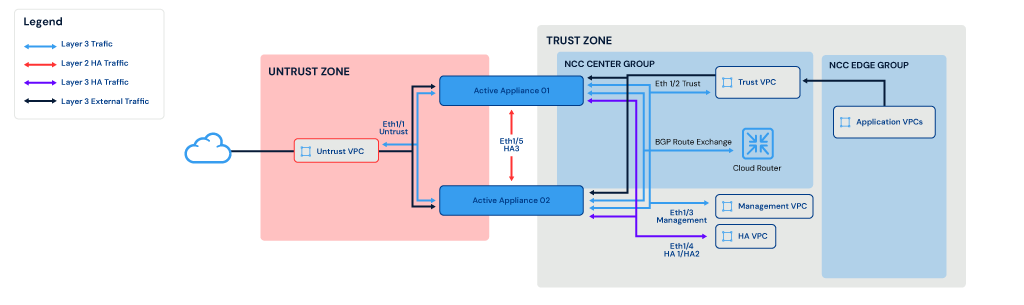
The above diagram shows 2x active/active appliances deployed across two zones (trust and untrust). In this model, the two active appliances communicate with each other via Eth1/4 (which includes the HA1 and HA2 links) and also via Eth1/5 (the physical layer 2 link for packet forwarding). External traffic traverses the trust VPC and enters either of the active/active appliances.
The two active/active Palo Alto appliances are hosted in the NCC Center Group, while application VPCs are hosted in the NCC Edge Group. In this example, BGP peering is used between Cloud Router and Palo Alto appliances for route exchange.
Active/Passive Deployment
In a Palo Alto active/passive deployment, one firewall actively processes all traffic while the other remains in standby, ready to take over if the active peer fails.
This mode ensures stateful failover with minimal disruption and is the only official HA mode supported on Google Cloud.
To allow active/passive to function correctly, you need two dedicated interfaces on the Palo Alto appliance VM:
- HA1 (control link)
- Handles heartbeat, configuration sync, HA state between peers
- Operates at layer 3 and is required to detect peer failure
- HA2 (data link)
- Synchronizes session tables, forwarding tables and runtime objects
- Operates at layer 3 and is required to persist sessions between failovers
During failover, the passive appliance becomes active and takes over all data plane and management responsibilities. Since only one appliance is active at any time, this setup avoids session asymmetry issues, as traffic always routes through a single appliance, ensuring symmetric return.
Failover between the two appliances in some cloud providers can be achieved using floating IP, a movable, reusable virtual IP that can be dynamically reassigned between resources to enable high-availability failover without changing client-facing endpoints. However, Google Cloud does not support floating IP (gratuitous ARP). Instead, there are two options available to allow near instant failover on Google Cloud:
- Internal/external load balancer
- Static internal/external IP address on the load balancer
- Backend appliances are health-checked, and traffic is automatically directed to the active node
- The health check on the passive node should fail until failover event
- Network Connectivity Centre (NCC) with dynamic routing
- Active firewall routes are advertised dynamically via BGP to Cloud Router
- Upon failover, the standby will advertise the same prefixes, causing Cloud Router to reroute traffic to the new active node
When deploying appliances in active/passive mode, you typically need five interfaces on the virtual machine:
- Untrusted VPC interface
- Trusted VPC interface
- Management VPC interface
- HA2 VPC interface
Since instance sizing can restrict the number of network interfaces that can be used on appliance, `n2-standard-4` instance types are often used.
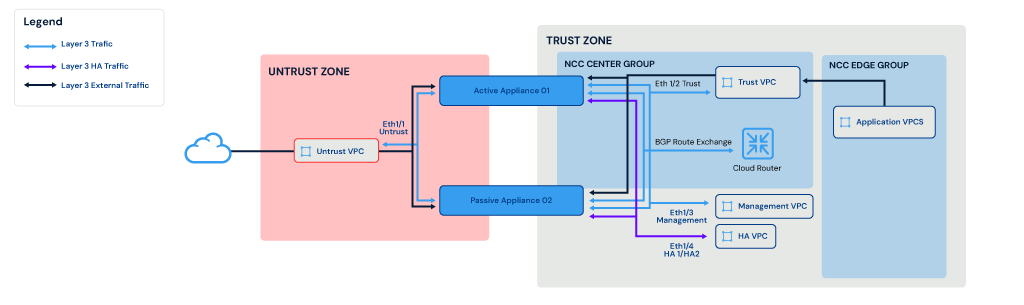
The diagram above illustrates a deployment with two active/passive appliances distributed across two zones (trust and untrust). In this setup, the appliances communicate with each other using the Eth1/4 interface, which carries both HA1 and HA2 traffic for high availability. External traffic is routed through the trust VPC and is handled exclusively by the active appliance.
The two active/passive Palo Alto appliances are hosted in the NCC Center Group, while application VPCs are hosted in the NCC Edge Group. In this example, BGP peering is used between Cloud Router and Palo Alto appliances for route exchange.
Single or Multiple Standalone Deployment
Palo Alto can also be deployed as a single appliance (with no HA failover) or as multiple standalone appliances.
When deploying Palo Alto as multiple standalones, it’s important to understand that there will be no communication between appliances, and thus you don’t get:
- Session state synchronization
- Configuration synchronization
- Synchronous traffic flow
Deploying multiple standalone appliances requires extra planning and caution. While there are solutions available to allow this deployment model to function, it is not officially supported by Palo Alto.
For example, to ensure session state synchronization, Palo Alto supports using an alternative backend in Google Cloud using Cloud MemoryStore as the Redis cache to store session information. This can be used with multiple standalone deployments to support synchronization, with sessions synced directly to MemoryStore. During a failover event, session state becomes available to other standalone appliances to continue the session. However, it is important to understand that this is typically used during a failover event. It does not and cannot support an active/active model.
Configuration synchronization can be achieved by either using Panorama (Palo Alto Centralized Management Solution) or using Terraform to configure individual appliances with the same configuration. You can also use Terraform to configure templates and devices within Panorama, which you then push out to the appliances.
Panorama and Terraform are the recommended approach for configuration sync with this model, as they provide a source of truth and allow device templates to ensure the appliances are configured correctly and don’t drift. While you can technically do this with Terraform and by configuring the appliances directly, this approach does not scale with additional appliances, forces multiple Terraform state files to be managed and makes it harder to ensure that the configuration remains synced between them and to audit changes or perform rollbacks.
Synchronous traffic flow is difficult to achieve with this deployment model. Let’s say we have three standalone appliances deployed on Google Cloud across three zones (appliance-01, appliance-02 and appliance-03). You need to ensure that any traffic leaving Palo Alto appliance 01 also returns on 01. Since there is no active session synchronization, if traffic exits on appliance 01 and returns on appliance 02, it is dropped because appliance 02 has no knowledge of that session. You must therefore ensure that traffic exits and returns to the same appliance.
There are two solutions to this:
- Use BGP and AS path pre-pending to force traffic through a single appliance.
- Use internal/external load balancers with session affinity and failover groups to pin traffic to a single appliance.
The above diagram shows 3x standalone appliances deployed across trust and untrust zones. In this model, the three standalones do not communicate with each other. Internal traffic routes from the trust VPC to one of the trust interfaces on an appliance and out of an untrust interface to the internet.
The three standalone Palo Alto appliances are hosted in the NCC Center Group, while application VPCs are hosted in the NCC Edge Group. In this example, BGP peering is used between Cloud Router and Palo Alto appliances for route exchange.
Palo Alto Deployment Summary
Active/active deployment: Is not officially supported in GCP and is not recommended until Palo Alto adds further support. While it is possible for active/active support to be added in future, it depends on either Google Cloud adding dedicated layer 2 NIC support or Palo Alto changing how HA3 interface communicates between peers, while keeping the same speed currently possible on layer 2.
Active/passive deployment: It is the default model used in most deployments in Google Cloud. With active/passive, you will automatically get native session synchronization, and you don’t have to be concerned about asynchronous routing as there is only a single Palo Alto appliance receiving traffic at any time. This model is fully supported by reference architectures from Palo Alto.
Within Google Cloud, the failover between active/passive is straightforward. Although the support for floating IP is not present in Google Cloud, this also speeds up the ability to failover, with either BGP or LB health checks allowing near-instant failover in most cases.
Lessons Learned
As discussed above, extra caution must be taken on the configuration to ensure all interfaces required are present, enabled, and working as expected. During development, it is wise to test a failover event while also having a continuous session running through the appliance. For example, you can SSH between two virtual machines in different VPCs. This connection will route via the appliance, so suspending the active appliance will cause HA to persist in the session, allowing the secondary appliance to take over. The SSH session may briefly become unresponsive but should return without disconnecting
Summary
In this blog, we have discussed various deployment strategies for Palo Alto appliances in cloud environments, focusing on how active/passive configurations can be extended to multiple standalone appliances.
We explored the importance of route advertisement using BGP, emphasizing the benefits of advertising default routes to ensure consistent egress for spoke VPCs, while also considering the option to advertise specific CIDRs for more granular control.
Additionally, we covered best practices for terminating IPSec tunnels on Palo Alto appliances, including how route advertisement and AS path prepending influence routing preferences and ensure seamless failover between firewalls.
By deploying Palo Alto firewalls and following best practices, your organization can achieve:
- Secure-by-design cloud migrations
- Hybrid and multi-cloud connectivity
- Advanced threat prevention
- Compliance with governance frameworks
By leveraging BGP and intelligent route control, you can ensure resilient, predictable network paths across environments while maintaining full observability of all traffic and threats. Combined with the ability to automate deployment, scaling, and policy management, this approach delivers consistent security and operational efficiency across your entire cloud footprint
Whether you’re deploying Palo Alto appliances in GCP, AWS, Azure, or a hybrid environment, the same principles apply. Robust routing design, consistent route advertisement, and resilient failover planning are essential to maintaining secure and predictable network operations.
Take time to evaluate your current deployment strategy and identify opportunities to enhance scalability, resilience, and control across all your cloud environments.
Reach out to discuss how these patterns can be tailored to your organization’s architecture.

Senior Solutions Engineer
Josh is a Solutions Engineer with a background in all things Cloud Native, Josh has been working with Kubernetes and other Cloud Native Technologies for 7 years and has a passion in all things tech, Josh’s original background is in Computer Networking. As well as this Josh is a keen gardener, and a very proud dad of one.