
Ingress has been the standard way to expose Kubernetes apps since 2015. It went GA in 2020 and gained huge adoption. Ingress-nginx alone has 19k+ stars and more than a thousand contributors. It became the default controller for most teams, including ours.
But Kubernetes traffic management has grown, and so have our requirements for routing, authentication, and security. With the retirement of ingress-nginx, our team used this moment as an opportunity to reevaluate our approach and move to a more modern and flexible model.
This post walks through our real migration from ingress-nginx to Gateway API using Envoy Gateway, including how we evaluated our options, prepared for the migration, validated our new setup, and ensured zero regressions.
Our goal is to give other teams a realistic look at what this kind of transition actually involves in a real, complex production environment and the practical lessons we learned from this journey.
Introducing our platform & requirements
Our platform hosts a collection of internal and user-facing services that are exposed through Kubernetes. Our setup relied on ingress-nginx as our primary ingress controller, with oauth2-proxy providing authentication/authorisation along with a variety of nginx annotations providing custom routing behaviours.
Before planning the migration, we spent time evaluating Gateway API and its wide range of implementations and defined a clear set of goals we wanted to achieve:
- Reduce reliance on annotations and custom controller behaviour
- Replace oauth2-proxy with native, platform-level authentication
- Prepare for future security and routing requirements
- Adopt a Kubernetes standard that will be supported long-term
Gateway API evaluation
Before selecting a specific Gateway implementation, we evaluated whether Gateway API itself was the right direction.
Gateway API is the next-generation networking API for Kubernetes. It is designed as the long-term successor to the Ingress API and provides a more expressive, extensible, and role-oriented model for controlling traffic into and within Kubernetes clusters.
Gateway API introduces well-defined, typed resources for traffic control:
- GatewayClass: Defines how the infrastructure behaves (similar to StorageClass)
- Gateway: The actual load balancer / listener
- Routes: Describe how traffic from a Gateway should be mapped to Kubernetes services
HTTPRoute, TCPRoute, GRPCRoute
These resources make Gateway API far more maintainable than annotation-driven ingress. Annotation-based configuration is powerful, but also easy to get wrong, e.g., a small or singular/plural mismatch can cause confusion, and debugging those issues isn’t fun. Gateway API’s structured, typed resources can reduce this.
To help evaluate it, we created a small test cluster and deployed the Gateway API CRDs:
kubectl apply -f https://github.com/kubernetes-sigs/gateway-api/releases/latest/download/standard-install.yaml
This allowed us to test basic listener behaviour, routing, hostname precedence, and the API’s usability before selecting an implementation. We also validated how cert-manager and external-dns work with Gateway API, since both are essential to our setup.
Evaluating implementations
There are several production-grade Gateway API controllers available. We decided to evaluate only two options to understand operational complexity, feature gaps, and how much they aligned with our authentication and routing requirements.
Kgateway (formally Gloo Gateway)
Kgateway implements the Kubernetes Gateway API by turning Gateway API resources into Envoy or AgentGateway config, depending on whether you’re handling microservices or AI workloads. It essentially provides a unified control plane for both.
| Benefits | Limitations |
|---|---|
| Very powerful, evolved from Gloo Gateway with extensive enterprise adoption | Additional features (like OIDC) require other components |
| Extensible, with custom CRDs and integrations that let you define advanced policies | More complex to operate |
| Uses Envoy for microservices and AgentGateway for AI | More features than we needed |
Outcome: Very powerful and flexible, especially for teams that want fine-grained control over Envoy’s data plane. However, it would still require extra components for authentication flows, which didn’t align with our requirements.
Envoy Gateway (chosen solution)
Envoy Gateway is an open-source control plane that manages Envoy Proxy and configures it directly from your Gateway API resources.
What made it our chosen solution:
| Benefits | Limitations |
|---|---|
| Provides native OIDC authentication and supports JWT validation and claim extraction | Some features are still maturing (filters, transformations, policies) |
| Clean integration with Gateway API | Use cases like AI traffic management require additional tooling or custom development |
| Simple, focused API surface | The community is still growing |
| Provides a 1:1 or 1: many deployment strategy, giving each Gateway its own Envoy deployment for better isolation, scaling, and security. |
We installed it in our test cluster with:
kubectl apply -f https://github.com/envoyproxy/gateway/releases/latest/download/install.yaml
This provided us with a fully functional environment to experiment with routing, authentication, observability, and operational aspects (PDB, HPA, scaling, etc.).
Outcome: While some features are still evolving, we believe Envoy Gateway is the best fit for our authentication and routing requirements.
Preparation & testing strategy
In our test environment, we validated our setup and ensured we understood how Gateway API and Envoy Gateway behave in practice.
Gateway resources
Previously, we had installed Gateway API and Envoy Gateway. Once installed, we created a Gateway to test listener behaviour:
apiVersion: gateway.networking.k8s.io/v1
kind: Gateway
metadata:
  name: test-gateway
  namespace: networking
spec:
  gatewayClassName: envoy
  listeners:
    - name: https
      protocol: HTTPS
      port: 443
      hostname: "*.example.test"
      tls:
        mode: Terminate
        certificateRefs:
          - name: cert
And an HTTPRoute:
kind: HTTPRoute
spec:
  parentRefs:
    - name: test-gateway
  hostnames:
    - "test".example.com
  rules:
    - matches:
        - path:
            type: PathPrefix
            value: "/abc123def/portal"
      backendRefs:
        - name: portal-service
          port: 8080
Then we could test:
- Listener and hostname matching
- HTTP to HTTPS redirection
- TLS termination
- Routing behaviour using HTTPRoutes
Authentication testing
One of our biggest requirements was replacing oauth2-proxy, and as we mentioned previously, Envoy Gateway offers native OIDC support, which can be implemented by a SecurityPolicy. We expected this to be fairly straightforward, and it was at the beginning until we faced a limitation.
We started on creating the SecurityPolicy:
apiVersion: gateway.envoyproxy.io/v1alpha1
kind: SecurityPolicy
metadata:
  name: demo-auth
spec:
  targetRefs:
    - group: gateway.networking.k8s.io
      kind: Gateway
      name: primary
  oidc:
    provider:
      issuer: "https://auth.example.com/"
    clientIDRef:
      Name: auth-config
    clientSecret:
      name: auth-config
    redirectURL: "https://echo.example.com/callback"
    scopes: ["openid", "email", "profile"]
    cookieDomain: "example.com"
  jwt:
    providers:
      - name: oidc-id-token
        issuer: "https://auth.example.com/"
        remoteJWKS:
          uri: "https://auth.example.com/.well-known/jwks.json"
        extractFrom:
          cookies:
            - id_token
        claimToHeaders:
          - claim: email
            header: x-authenticated-email
Then we discovered during this testing:
- We applied a SecurityPolicy to a Gateway that defined OIDC authentication and then tried to apply another SecurityPolicy on an HTTPRoute that defined additional authorization rules. This didn’t work as we expected since according to the docs, if an HTTPRoute has its own SecurityPolicy, it takes precedence over the Gateway’s policy for that route, but it doesn’t combine with the Gateway-level policy and you must define the complete policy for that route, if you want different behaviour. This means SecurityPolicies don’t merge; the route-level policy completely overrides the gateway-level policy for that route.
- All referenced secrets (clientIDRef, clientSecret) must be in the same namespace as the SecurityPolicy.
These surprising challenges became our major test focus and easily would have caused production issues if we discovered them late.
JWT validation and claim injection
We validated JWT behaviour using:
extractFrom:
  cookies:
    - id_token
claimToHeaders:
  - claim: email
    header: x-authenticated-email
We intentionally tested with misspelled claim names or invalid signature scenarios.
Cert-manager
- Upgraded to 1.19.x for Gateway API support.
- Migrated certificate issuance to reference Gateway API HTTPRoutes in addition to ingress objects.
- Ensured our Gateway control plane could consume cert-manager issued certificates correctly.
- The cert-manager team’s announcement about ingress-nginx EOL reinforced the importance of making this change early.
External-dns
- Updated to enable Gateway API support so it can watch HTTPRoutes
sources:
  - gateway-httproute
</pre
Side-by-side operation with ingress-nginx
Finally, we ran nginx and Envoy side-by-side for several days making sure routing and authentication worked.
Introducing new architecture
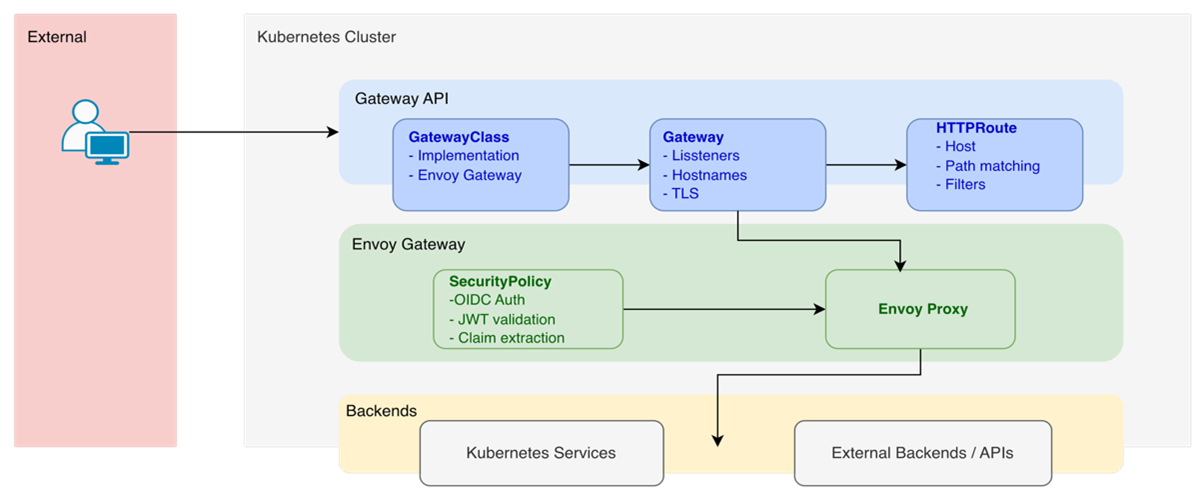
Gateway
A single Gateway resource defines:
- One or more network listeners (e.g., HTTP, HTTPS)
- Wildcard or specific hostnames
- TLS configuration
- Allowed namespaces for routes
Routes
Each legacy ingress became an HTTPRoute, except TLS, which is now handled at the Gateway level.
Routes define:
- The hostnames they apply to. These must match one of the Gateway’s listener hostnames; otherwise, the Route will not be accepted.
- How requests are matched
- Optional filters (redirects, rewrites, authentication hooks)
Authentication
One of the most significant improvements was replacing oauth2-proxy with native OIDC support built into Envoy Gateway.
Envoy Gateway now handles:
- Redirecting users to the identity provider
- Handling callback exchanges
- Validating ID tokens
- Managing user sessions via secure cookies
- Extracting JWT claims and attaching them to upstream requests
As we saw in the preparation and testing section, this is all done through a SecurityPolicy.
This reduced the number of moving parts in the authentication flow, significantly making this easier to troubleshoot and reducing the cognitive overload of multiple components within the platform being maintained, scaled and secured.
Limitations & security considerations
We identified several considerations when adopting Gateway API and Envoy Gateway:
Technical
- Some features (filters, transformations) are still maturing
- Requires understanding listener precedence and route attachment rules
- Policy resources (authentication, JWT, rate limiting) may change as the API matures
- Knowledge of Envoy and its configuration language (XDS) to understand how/what the config will look like.
Security
- Session cookies must be scoped correctly
- JWT validation must be configured carefully to avoid leaking sensitive information.
TLS & certificate management
- cert-manager needed to be upgraded to v1.19 to fully support Gateway API
- Certificates are now attached at the Gateway listener level instead of per ingress, which changes how they are requested and validated
Migration complexity
- Dual-stack operation required:
- Running both nginx and Envoy Gateway simultaneously
- Maintaining two sets of routing configuration
- Careful DNS management to avoid conflicts
- OIDC and JWT are separate concepts and must be configured correctly
We should take the time to emphasise here that this wasn’t just a simple YAML swap. We modified around 60 files, from Helm templates to certificate and DNS configurations.
Ensuring no regressions
To ensure a smooth migration, we validated:
- All routes resolve as expected
- Authentication flows using Envoy Gateway’s native OIDC worked consistently
- Claims are mapped correctly into headers
- TLS certificates were issued and rotated correctly through cert-manager
- Applications do not require changes
- A complete rollback plan (DNS back to nginx)
We had a gradual migration process:
- Dual stack deployment: Both systems running simultaneously
- DNS cutover
- Monitor and validate
- Decommission nginx
Final Outcome
In the end, we successfully retired the ingress-nginx controller and switched our traffic routing over to the Kubernetes Gateway API, all with zero downtime and no impact on our customers. From start to finish, this took around 2 weeks of engineering effort.
The benefits and improvements we noticed were:
- Cleaner configuration: We could replace loads of annotations with the resources provided by Gateway API. Using Gateway and HTTPRoutes has made our routing configuration easier to understand and maintain.
- Aligned with Kubernetes standards: By adopting Gateway API, our platform now uses Kubernetes native APIs, which ensures long-term support and flexibility.
- Simpler operations: Replacing oauth2-proxy with Envoy native OIDC, as well as getting rid of those bunch of annotations, made things easier to operate and debug.
- Ready for the future: Gateway API features are maturing and becoming the right choice for advanced traffic management in Kubernetes. By moving now, we can take advantage of upcoming features or capabilities with a minor rework or fewer challenges.
Takeaways for other platform teams
Finally, here are our main takeaways we can share with other platform teams:
| Do | Don’t | |
|---|---|---|
| Start with evaluation, not implementation |
|
|
| Build a complete prototype first |
|
|
| Plan for dual-stack operation |
|
|
| Document everything |
|
|

Maria is a Senior Solutions Engineer with a strong Cloud Native background. She’s been working with Kubernetes and related technologies for over 6 years, after starting her career in Systems Engineering. Outside of tech, Maria is a foodie who loves music, live gigs, and staying active through sports.